

Google Analytics is one of the most well-known and popular analysis and statistics tools for websites and apps available to companies. However, there are some restrictions when using it, particularly regarding limitations and legal aspects. Many website operators therefore ask whether they can use Google Analytics without consent, because every rejected cookie banner means a visitor who disappears from their reports.
In this article, we explain how Google Analytics 4 works, why the standard setup requires consent, which technical options exist and what Google Analytics without consent looks like in practice.
Can You Use Google Analytics Without Consent?
Not in its standard setup. Google Analytics 4 stores a client ID in a cookie and transmits the visitor’s IP address and user agent to Google, so it requires consent under the GDPR and § 25 TDDDG. In reduced form, however, basic data can be collected without consent: a server-side tagging setup removes cookies and personal data before anything reaches Google.
Important: “without consent” does not mean “without a cookie banner”. You still need a consent management platform (CMP) to ask visitors for consent, document their decisions and send the full data set only for users who agreed. And the legal assessment of consent-free measurement is not uniform. We cover this in the section on legal limits below.
How Does Google Analytics 4 Work?
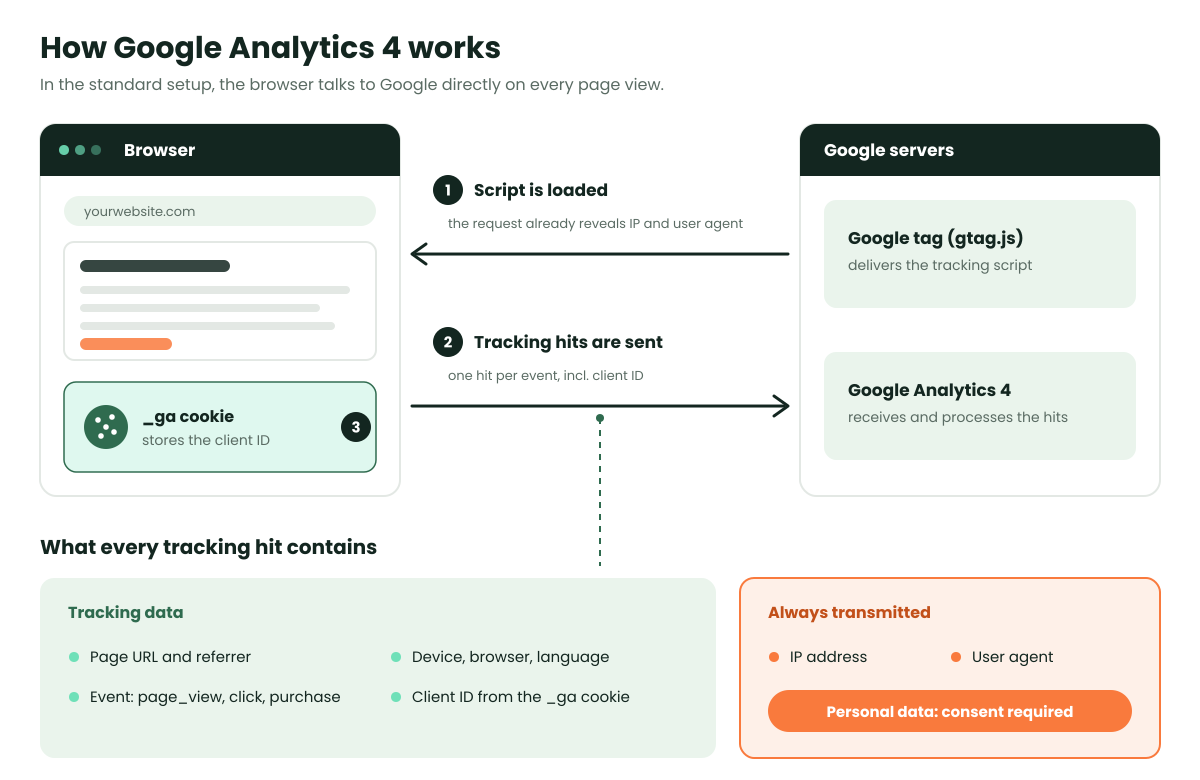
Understanding how the service works is important to compare the standard implementation with a possible alternative implementation for Google Analytics without consent. In a standard setup, three things happen on every page view:
- The script is loaded from Google. First, the Google Analytics script (the Google tag) is retrieved from Google’s server. The trigger could be a <script> tag in the head of the website or a tag management system such as Google Tag Manager.
- Tracking hits are sent to Google. In a second step, the script sends so-called tracking hits directly from the browser to Google (also known as “tracking requests” or “collects”). In GA4, every interaction is an event: a page view, a scroll, a click or a purchase.
- A cookie identifies the user. The hits contain the actual tracking information, for example the visited page, device and browser information (screen resolution, language, etc.) and the client ID. This ID is stored in a first-party cookie (_ga) so Google can recognise users and sessions.
Why Standard Google Analytics Requires Consent
Roughly speaking, two major data protection issues arise when using Google Analytics, plus a third one because the data leaves the EU.
Personal Data: IP Address and User Agent
Since the Google Analytics script is usually retrieved from a Google server, the IP address and the user agent of the visitor inevitably end up at Google. Under the GDPR, an IP address counts as personal data. Even data protection-friendly settings cannot change this, as the IP address must be sent along with the retrieval of the tracking script and with every tracking request.
GA4 no longer offers the “anonymize IP” setting of Universal Analytics. According to Google, IP addresses are neither logged nor stored in GA4. But this only happens after the request has reached Google’s servers. The transmission itself cannot be prevented in a standard setup.
Data Transfer to the USA
With the Schrems II ruling in 2020, the transfer of personal data to the USA became a particular problem, as the country was considered an unsafe third country. In 2022, several European supervisory authorities, including those of Austria and France, found the use of Google Analytics unlawful on this basis.
Since July 2023, the EU-US Data Privacy Framework (DPF) has allowed transfers to certified US companies again. In September 2025, the EU General Court dismissed a challenge to the framework (Latombe v Commission, T-553/23). An appeal is pending before the Court of Justice (C-703/25 P), the court that struck down both predecessor agreements. Transfers are currently permitted, but the legal basis remains fragile.
Cookies and Profiling
For Google to recognise users and user sessions, a cookie with a client ID is placed in the browser when the Google Analytics script is accessed. With the help of this cookie, users can then be assigned across different sessions and periods. Various supervisory authorities classified the Google Analytics cookies as requiring consent years ago.
In Germany, § 25 of the Telecommunications Digital Services Data Protection Act (TDDDG, formerly TTDSG) requires consent for storing or reading any information on the user’s device, unless it is strictly necessary for a service the user requested. This applies regardless of whether the information is personal. Website operators therefore cannot simply move the client ID to other storage, such as local storage or session storage.
The result: A large part of the information collected with Google Analytics is not personal, so theoretically, it could be processed without consent. However, since the browser metadata (IP address and user agent) is inevitably transmitted and a cookie is set in the standard setup, use without consent is not possible. This also applies to the storage of information on a smartphone when using a mobile app.
Option 1: Google Consent Mode v2
Google Consent Mode passes the visitor’s consent status from your CMP to all Google tags, which then adjust their behaviour. Since March 2024, Consent Mode v2 has been required for advertisers who want to use Google’s measurement and personalisation features for users in the EEA. It comes in two variants:
| Basic Mode | Advanced Mode | |
|---|---|---|
| Google tags before a consent decision | Blocked | Loaded, consent denied by default |
| Data sent without consent | None | Cookieless pings |
| Behavioural modelling in GA4 | Not available | Available if thresholds are met |
What Cookieless Pings Contain
When a visitor declines, Advanced Mode sets no cookies. Instead, the tags send pings with a timestamp, the user agent, the referrer, the consent status, a random number per page load and, if present, an ad click identifier such as the GCLID. There is no client ID, so GA4 cannot link one page view to the next.
How GA4 Uses These Pings
GA4 feeds the pings into behavioural modelling: machine learning estimates what non-consenting users did, based on the behaviour of similar users who consented. A property is only eligible if:
- Consent Mode runs in Advanced Mode on all pages
- it collects at least 1,000 events per day with analytics_storage=’denied’ for at least 7 days
- at least 1,000 daily users send events with analytics_storage=’granted’ on at least 7 of the previous 28 days
Many small and mid-sized websites never reach these thresholds. And modelled data is an estimate, not an observation.
Why Consent Mode Alone Is Not Enough
Cookieless pings are still sent directly from the browser to Google, together with the visitor’s IP address and user agent. Advanced Mode on its own therefore does not solve the issue described above. It needs a server between the browser and Google. For a detailed comparison of Basic and Advanced Mode and how to combine them with server-side tracking, read our guide to privacy-compliant tracking without consent.
Option 2: Server-Side Tagging
To be able to use Google Analytics without consent, two modifications to the standard configuration are necessary. On the one hand, the service must not store cookies or similar information on the user’s device. On the other hand, all personal data must be removed from the tracking hit before it reaches Google.
The solution is a server tag manager. Instead of sending the data directly from the browser to Google, the browser only sends it to your own server. This server in turn connects to the Google Analytics servers and only transmits information that is not personally identifiable. Sensitive data, such as the IP address or the user agent, remain on your server. No cookie and no client ID are used. In Google Analytics, the basic information (which page was visited, when and from which type of device) still arrives, but Google can no longer identify the person who triggered the request. If you are new to the concept, start with our explanation of what server-side tracking is.
The Tagging Server
There are different ways to set up a tagging server. Our recommendation, especially for Google products such as Analytics, is the Google Tag Manager server container. Like the well-known web container, it is free for every Google user. A Google Analytics 360 subscription is not required.
Within the server container, so-called clients must be created. Clients are the endpoints that receive incoming analytics data, process it and forward it to the Google servers. Google offers its own client templates for Analytics and Ads, but they are not suitable for running Google Analytics without consent. Instead, a custom client template must be developed that receives and cleans the data accordingly. This is not trivial: it requires advanced knowledge of how Google Analytics works technically, as well as solid JavaScript skills. More on the setup in our guide to server-side tagging with Google Tag Manager.
Hosting and Costs
The server container needs its own infrastructure, typically Google Cloud Run or a specialised hosting provider. Ideally, it runs on a subdomain of your website (for example data.yourdomain.com) with servers located in the EU. Running costs depend mainly on traffic volume. We estimate them individually as part of a server-side tracking project.
Less Affected by Browser Tracking Prevention
Today, most browsers use tracking prevention by default, such as Safari’s Intelligent Tracking Prevention (ITP) or Firefox’s Enhanced Tracking Protection (ETP). They shorten the lifespan of cookies or interrupt the data flow to known tracker domains. Because all data flows through a tagging server on your own domain, server-side tagging is far less affected by these mechanisms.
This concerns technical data quality, not the visitor’s choice. Whether a user has consented still decides which data is sent to Google.
Google Analytics Without Consent in Practice: The DWC Setup
We recommend the following setup to our customers: A Google Tag Manager server container receives all data, regardless of whether the users have given their consent or not. A Google-certified CMP records each visitor’s decision, and Consent Mode passes it on with every request. Depending on the consent, either only the so-called basic data (non-personal) or the complete data set (personal) is transmitted to Google.
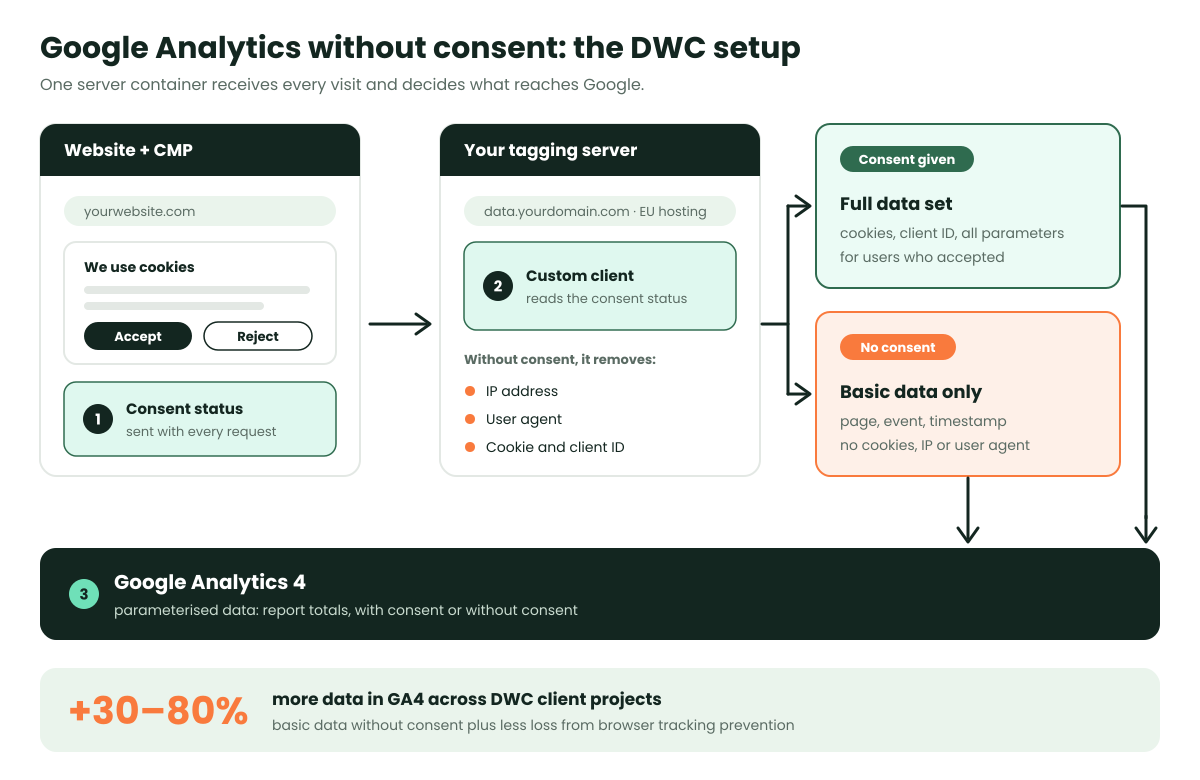
Since the data is parameterised in both cases, you can later view in Google Analytics either the total amount of data or only that of the users with or without consent.
The results: In most cases, DWC was able to increase the customer’s database by at least 30%. In individual cases, even an increase of up to 80% was recorded. The reasons for this are not only the collection of basic data without consent, but also the reduced impact of browser tracking prevention thanks to the customer’s own server. How much you recover depends on your consent rate, your visitors’ browsers and the share of ad blockers.
Legal Limits and Risks
Server-side tagging reduces the data that reaches Google. It does not automatically make consent unnecessary. Three points remain debated:
- § 25 TDDDG: The rule covers any storage of or access to information on the user’s device, whether personal or not. German supervisory authorities interpret it broadly. Whether the request from the browser to your own server already counts as access to device information is disputed.
- Your own server processes personal data: The IP address still reaches your tagging server. You need a legal basis for this, typically legitimate interest under Art. 6(1)(f) GDPR, backed by a documented balancing test.
- Advanced Consent Mode without a server: Cookieless pings sent directly to Google include the IP address. Used on its own, Advanced Mode is hard to justify without consent.
Before going live with Google Analytics without consent, make sure you have:
- a Google-certified CMP that documents every consent and rejection
- a privacy policy that describes the server-side processing and the basic data sent to Google
- data processing agreements with Google and your hosting provider servers located in the EU
- a documented balancing test for legitimate interest, reviewed by your data protection officer
- regular checks of your setup, for example with our free Consent Mode Decoder
Conclusion: Google Analytics Without Consent Needs the Right Setup
Google Analytics without consent is possible, but not out of the box. The standard setup sets cookies and sends the IP address and user agent to Google, so it requires consent. Consent Mode v2 alone does not change that.
A server-side setup with a custom client sends non-personal basic data to GA4 for users who decline, and the full data set for users who consent. In our projects, this increased the data basis by 30 to 80%. Because the legal assessment is not uniform, the setup should be documented carefully and reviewed with your data protection officer.
Do not hesitate to arrange a non-binding initial consultation with us. We will check your current web analytics and online marketing configuration free of charge and optimise your Google Analytics settings.
Book a free initial consultation or get your Free Website Check
This article provides general information and does not constitute legal advice.